 Kitsukey
Password key for your keychain
A USB key that types your passwords for you.
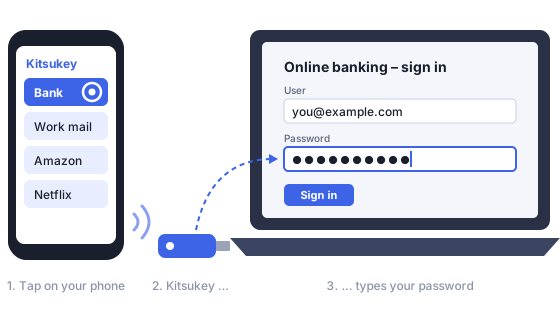
Plug Kitsukey into your computer. Tap “Bank” on your phone. The key types your bank password into the login field – as if you had typed it yourself.
- Your passwords are stored only on the key, encrypted.
- Not on your computer. Not on your phone.
- Lost the key or the phone? Useless to anyone else.
In development – not for sale yet. Join the waitlist to hear first.
The problem
Your password manager is open on your PC most of the day. Walk away for a coffee and anyone at your desk can scroll through every password you have. Locking it all the time is annoying, so nobody does.
Kitsukey keeps the vault off the computer altogether. The PC only ever sees keystrokes – one password, at the moment you ask for it.
How it works
- 1
Plug in and unlock
Plug the key into any computer and unlock it once with your PIN and fingerprint in the app. No driver, no software on the PC – it is a standard USB keyboard.
- 2
Tap an entry, touch your finger
Your phone shows the list of entries, e.g. “Bank” or “Work mail”. Tap one, confirm with your fingerprint, choose what to type: user name, Tab, password, Enter.
- 3
It types for you
The key types into whatever field is active. For sensitive entries you also touch the key itself. Unplug it and it is locked instantly.
Security by design
The planned design – details will be published with the source code.
Passwords live only in the key
Every entry is encrypted with AES-256-GCM inside the key. Secure boot and flash encryption are on, debug ports are permanently disabled.
A key split in three
The decryption key only comes into being from three parts together: a secret burnt into the chip, a share held in your phone's security chip, and your PIN. Any one part alone is useless.
Safe even if the key is stolen
Even an attacker who extracts the chip's memory in a lab finds only encrypted data – without your phone and PIN it cannot be opened. Too many wrong PINs and the key locks itself.
Your fingerprint for every password
Each typing request is signed in your phone's security chip and needs your fingerprint. The phone never sees a password – only the names of your entries.
Touch the key for what matters
Pairing a new phone and sensitive entries need a touch on the key itself – proof that you are really sitting at the computer, even if someone controlled your phone.
Encrypted, authenticated Bluetooth
Pairing only after touching the key, with a code check against eavesdroppers, plus an extra encrypted channel on top. Paired phones can be listed and revoked.
Lost phone? No problem
Pair a second phone, or restore with your 24-word recovery code. A lost phone can be locked out from any other paired phone.
Encrypted backup
Back up to a file or a second key – encrypted with your recovery code, so the backup is useless to anyone else.
Your keyboard layout
German, Austrian, US and more – special characters arrive exactly as stored.
What it does not protect against
We would rather tell you up front:
- Malware on your PC. A keylogger sees what is typed, just as it would see you typing yourself.
- Phishing. The key does not check which website you are on (FIDO keys like a YubiKey do). For your most important accounts, a FIDO key remains the better choice – Kitsukey is for the hundreds of other passwords.
Questions
Can I buy it?
Not yet. Kitsukey is at the concept stage. We are checking whether enough people want it before building it as a product. Join the waitlist and you will hear first.
Which phones will work?
Android first (with fingerprint sensor), iPhone later.
What if the key breaks or gets lost?
You can keep an encrypted backup on a second key or in a file. A lost key is useless to the finder: without your phone, fingerprint and PIN it cannot be opened.
What if I lose my phone?
The phone holds no passwords. Lock it out from a second paired phone, and pair your new phone with your recovery code. Your passwords stay on the key.
Can I import from KeePass / KeePassXC?
Yes, a one-time import from KeePass (.kdbx or CSV) is planned. Exports are encrypted only.
How do new passwords get onto the key?
Ideally the key generates them itself. If you enter one on the phone, it is sent once, encrypted, and not kept on the phone.
Will it be open source?
That is the plan. A security device you cannot inspect is hard to trust.
Want one?
Leave your e-mail address and we will tell you when Kitsukey is ready – no newsletter, no spam.